
Today we are releasing a small update with some important fixes to recent UI changes from the 0.14.1 Update – UI Facelift, Cut & Paste, Loop Subpatch Node, Piano Roll Editing, Bugfixes update, the ability to open VST plugins from common standard install folders, as well as some additional fixes.
Priority Fixes
- Fixed a performance issue where long projects would cause major UI lag on the Timeline
- Fixed a bug that would sometimes cause some Nodes to unexpectedly output a constant 0
Node Changes
Knob Node
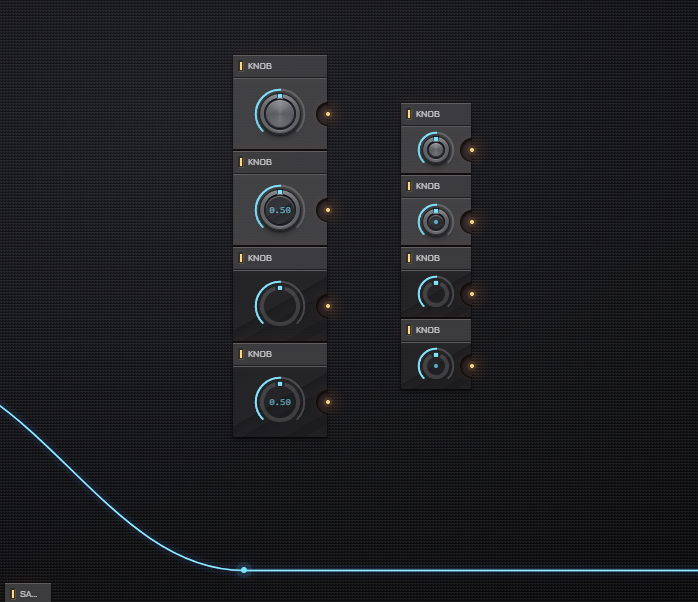
- The label under the knob now only shows if the Knob Node is renamed to a custom name
- Expanded the Appearance setting to 4 options total: Normal (default), Labeled, Flat, Flat Labeled
- Normal and Flat no longer display the value label
Subpatch Node
- Added an option to enable or disable showing inner node status via the Node’s standard LED feedback status
- Showing the status is now off by default for existing Subpatch Nodes (including Custom Nodes), but is enabled by default for newly placed Nodes
- The setting can be toggled from the Custom Node Designer
VST Plugin Node
- Added an option to scan & open plugins from standard common VST installation folders when opening a plugin
- Fixed a(nother) bug where plugins with more than 32 channels would crash — note that plugins with more than 32 channels are currently not supported, this just fixes the crash, channels above 32 are still ignored for now
Project Info Node
- Added a Base Note Output, which outputs the project’s configured base note as a signal (0 = C, 1 = C#, 2 = D, etc.)
Misc Changes & Fixes
- Fixed a bug that would sometimes cause a knob’s value to get stuck on the UI
- Center value display on knobs no longer overflows the knob’s center screen piece when it’s too long to fit
- Slightly adjusted colors and sizing on knobs to make it easier to recognize their value set at a glance